![theorem-technologies-logo.png]](https://theorem.io/hs-fs/hubfs/branding/theorem-technologies-logo.png?height=40&name=theorem-technologies-logo.png)
This article is a summary of the core concepts surrounding Theorem's matching engine.
Quick Summary
Theorem's matching engine is a background process designed to silently match data incrementally throughout the day as new data arrives. Match results are enriched into the portal's Data Viewer tool and match report artifacts can be generated on demand or automated. The engine is optimized to reduce noise by accepting client-defined tolerances and highlights probable reasons for discrepancies.
When Matching Runs
Theorem’s matching engine runs as new trade data arrives.
When a new file is detected and imported into Data Viewer, incremental matching is triggered. The matching engine evaluates the new data against relevant unmatched activity and updates match results when new matches or discrepancies are found.
Matching can also be affected by manual actions, including rematching selected trades or affirming trades outside the matching process.
How Matching Results Are Organized
Matching results are organized into Match Groups.
A Match Group is the matching engine’s working unit for organizing matched and unmatched trade activity. Match Groups allow Theorem to summarize related activity across reports and app views without requiring every individual trade to appear separately in every context.
Matched activity remains stable once assigned to a Match Group. Unmatched activity may continue to change as new data arrives and unresolved activity is re-evaluated.
What Affects Matching Results
For trades to match, these must be equal:
- Account
- Security
- Product
- Contract Maturity, based on the product, that might include:
- Year
- Month
- Day
- Hour
- Duration
- Strike
- Call vs Put
- Side
- Quantity
- Trade Price
In addition to the above, some optional data can be enabled that must be equal for matches, including:
- Venue
- Executing Broker
- CCP
- Give In Broker
- EFP Indication
- Commissions
- Fees
Individual vs Aggregate
Whenever possible, Theorem's matching engine will match on a record-to-record, or one-to-one, basis. Within the same account/security/side, we will create as many of these matches as possible without splitting up trades.
If there are still unmatched records, the matching engine will progressively group trades to find one-to-many, many-to-one, and volume weighted average price matches. In every case, each group of matched trades must total up to the same quantity and have the same notional value, that is, the same actual trade price or volume weighted trade price.
Setting Tolerances
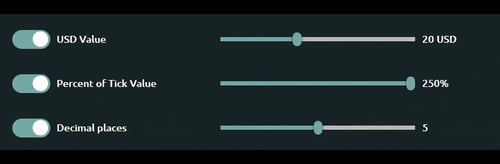 Many clients may find difficulty when all or some of the trades are using average prices. Theorem's matching engine allows you to set tolerances so that trades with the same quantity but slightly different notional values are marked as matched, thereby reducing the noise of match reporting.
Decimal Places
This setting uses traditional rounding. When enabled, trade prices are rounded to the indicated decimal places before being matched.
Percent of Tick Value
The Percent of Tick Value (PoTV) is a fraction of each product's minimum price increment in its native currency. Setting PoTV to 250% means that two trades with the same quantity can have a notional value difference of up to 2.5 times that product's minimum increment.
USD Value
The USD Value is a permitted notional difference, in US dollars, for two trades with the same quantity. If the trade is not denominated in USD, the matching engine will convert the notional values at the most recent rate.
How Users Can Intervene
The matching engine runs automatically and silently as a background process as new data arrives, but sometimes users might want to make changes to the results that it generates.
Rematch
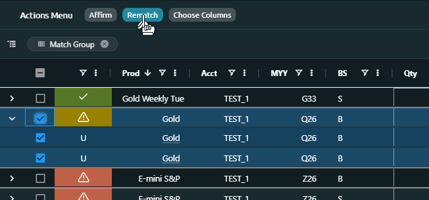 Use the Theorem Data Viewer's Rematch button to select 2 or more trades to submit to be rematched. Rematch can be done against both matched and unmatched trades.
Rematch does not "force" the trades to match but rather directs the matching engine to look at the selected trades specifically.
Affirm
Use the Theorem Data Viewer's Affirm button to designate the rows selected as Affirmed. An Affirmed trade means that it is manually agreed to by a user. These trades are visible to the Trade Viewer and some reports but for the purposes of match scores they are taken out of the denominator.
Match Settings
The optional match settings mentioned earlier are progressive. They only affect future data or future rematches. Many users find it useful to temporarily change some match settings, rematch, and then change those settings back to the original. This allows the user to be in control of what trades use what settings on a case by case basis.
Related Articles
Many of the topics covered in this article are discussed with more depth in related articles. To explore more key concepts:
Other Related Articles