![theorem-technologies-logo.png]](https://theorem.io/hs-fs/hubfs/branding/theorem-technologies-logo.png?height=40&name=theorem-technologies-logo.png)
Overview
Use this report to summarize the overall match status by category and list all of the unmatched trades, summarized by quantity and price. The matching engine's discrepancy detection system will group together unmatched trades by discrepancy.
Summary Page(s)
The summary pages are only visible on the PDF versions of this report.
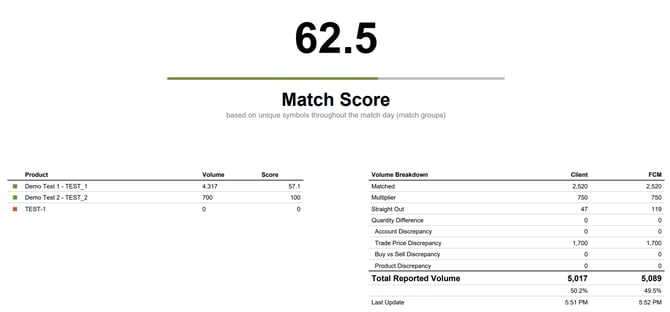
- Match Score. This is the percentage of Match Groups that are matched in the report.
- Category Breakdown. The report can be run to summarize by account or by product. Based on this setting, the first page(s) of the report will list all accounts/products and the total volume and match score per each. For reports with many values, the summary might be pushed to the second page or the smaller accounts may be lumped into an "All Other" category.
- Volume Breakdown. For each of the two sources of data, the total traded volume across all accounts and products is summarized by matched and various types of unmatched status.
- Matched Volume Percentage. Each source of data has a percentage value just below the Total Reported Volume figure. This is the percentage of that volume that is matched.
About Match Groups
A Match Group is the matching engine’s working unit for organizing matched and unmatched trade activity. The Match Summary Report shows the unmatched Match Groups produced by the matching engine, organized by account, security, side, and discrepancy. These groups may change throughout the day as new data arrives and discrepancies are re-evaluated.
Unmatched Summary Only
To save space and rows, this report's detail section only has the total quantity and prices of unmatched Match Groups. Matched trades are omitted from this report. Individual trades in the same account, security, side, discrepancy combination roll up into one row.
Detail Pages and MatchData Sheet
In the PDF version of this report, each group of accounts or products (based on your preference) will contain a match score header and a volume total footer. The volume total represents the unmatched trade total.
Every individual row of this report is a unique unmatched Match Group.
- The first columns of the row identify the attributes of the Match Group; things like product code, product name, contract, symbol, and side. The PDF version may show a different set of identifying columns depending on the selected report format.
- Near the center of each row the total quantity and volume weighted trade price for each group will display. The source of truth (usually client) will appear before the counterparty (usually FCM).
- The ending columns of the row always include
- Sequence (Seq). This is the product value used at the source, not the normalized version. In other words, this is the product identifier used by the client (or FCM) system.
- Status. A description of the nature of the unmatched Match Group. PDF reports with smaller page widths will have more terse status descriptions.
- Age is the amount of time the unmatched Match Group has been pending. Trades from multiple times of the day often are consolidated into one row. In these cases, the oldest trade is used as the age. The age is "rounded" to 15 minute increments.
Discrepancy Highlights
When the matching engine's discrepancy system flags a probable discrepancy, the column will be highlighted to call attention to the difference. If the discrepancy is the group itself on the PDF report, the Status column will contain a hyperlink to help find the opposing trades on the report.
For trade price discrepancies, the highlight color is lighter or darker depending on how many decimal places the prices are in disagreement.
Related Articles
This article was written based on the Match Summary Report version 0.1 beta.